Buying used tech correctly can save you 30–60% off retail prices. Buying it incorrectly can cost you more than buying new, once you factor in repairs, shipping returns, and time lost. This guide covers every check you need to run before handing over money — for phones, laptops, and everything else.
The used tech market has matured significantly. Platforms like Swappa, Back Market, and eBay's certified refurbished program have introduced grading standards and buyer protections that reduce (but don't eliminate) risk. Understanding the difference between "Certified Refurbished," "Seller Refurbished," "Good condition," and "Fair condition" is step one.
Where to Buy: Platform Comparison
Back Market — Best Overall for Phones and Laptops
Back Market connects buyers with professional refurbishers who are graded and monitored on device quality and customer service. Devices come with a 12-month warranty. The grading system (Excellent, Good, Fair) is more consistently applied than eBay's free-form condition descriptions. Price premium over eBay is usually 5–15%, which is reasonable for the warranty and vetting. Best choice for anyone who wants the convenience of one-click buying with meaningful protection.
Swappa — Best for Phones
Swappa focuses specifically on phones, tablets, and laptops, and requires sellers to submit photos of IMEI/ESN check results before listing. Their human review team rejects listings that appear fraudulent or overpriced. No carriers are locked, and devices with bad ESN (stolen or with unpaid balances) are rejected. Lower prices than Back Market on average, but no warranty beyond PayPal Goods & Services protection. Best choice for the savvy buyer who knows what to check and wants the lowest price.
eBay Certified Refurbished — Best for Computers
eBay's top-tier certified program (distinct from regular eBay listings) requires sellers to meet quality standards and provides a 2-year warranty with free returns. The program is strongest for laptops, tablets, and desktops from major brands. For phones, Back Market or Swappa tend to be more competitive. The eBay Money Back Guarantee on all transactions provides a floor of protection even for non-certified listings.
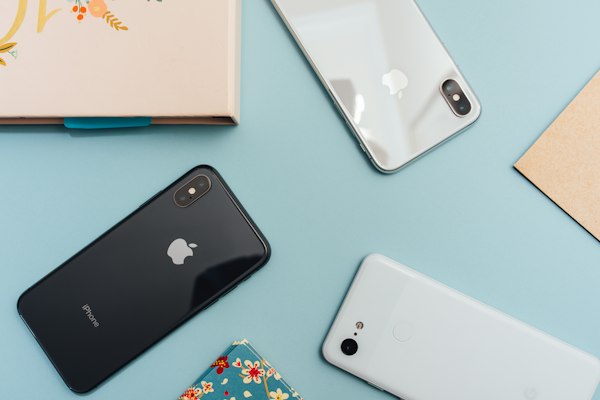
Always request detailed photos of actual corners and edges — not stock images. Wear patterns on corners reveal real usage history.
The Complete Used Phone Checklist
For iPhone or Android — run every check below before completing a purchase (or within the return window for platform-mediated sales):
Step 1 — IMEI/ESN Check (do this before anything else): Get the IMEI (dial *#06# or find it in Settings) and check it on IMEI.info or your carrier's website. This tells you if the phone is stolen, blacklisted, or has an unpaid carrier balance that will prevent it from activating. A phone with a bad IMEI is worthless, regardless of condition. This check is free. Never skip it.
- iCloud/Google Account Lock: For iPhones, go to Settings → [Owner's Name] and confirm no iCloud account is logged in. A locked iPhone that retains the previous owner's Apple ID is a $1,000 paperweight. For Android, confirm no Google account or Samsung account is signed in under Settings → Accounts.
- Screen: Check for dead pixels (open a solid white image), burn-in (open a solid gray image and look for ghosting), and touch responsiveness in all four corners and the edges — the most common failure point.
- Battery Health: iPhone: Settings → Battery → Battery Health. Android: Battery apps vary by manufacturer, but most show cycle count in diagnostic menus. For iPhones, anything above 80% health is acceptable; 85%+ is good. For Android, under 500 charge cycles suggests light use.
- Cameras: Test every lens — main, ultra-wide, telephoto, front. Check for focus hunting, purple fringing on the front camera, and confirm video recording works at full resolution.
- Speakers and Mic: Play audio from both the earpiece and speaker. Call a friend and confirm your voice sounds clear — mic issues are common in used phones and hard to diagnose from photos.
- Buttons and Ports: Every button (volume, power, mute toggle), Face ID / fingerprint sensor, every charging contact. Plug in a cable and confirm charging starts. Insert a SIM card to confirm the SIM tray isn't bent.
- Connectivity: Connect to Wi-Fi, make a call, test Bluetooth — all in the first 30 minutes.
Laptop-Specific Checks
What to Check Before Buying
- Battery cycle count: On Mac: Option-click the battery icon → Cycle count. On Windows: Command Prompt → `powercfg /batteryreport` → look for "Cycle Count" in the saved HTML report. Under 300 cycles is good; over 500 means the battery may need replacement soon.
- Screen uniformity: Open a solid gray desktop background and look for bleed, clouding, or dead zones, especially in corners. This is harder to fake in photos than scratch damage.
- Keyboard wear: Keys with worn legends indicate heavy use. More importantly, check every key for responsiveness — sticking keys on a laptop require a potentially expensive keyboard replacement.
- Thermal performance: Run a CPU stress test (Prime95, free) for five minutes. If the fan sounds like a jet engine at idle, or the chassis becomes painfully hot in the first minute, thermal paste may need replacement — a $30 fix that reveals the previous owner's usage pattern.
- Storage health: On Mac: Applications → Utilities → Disk Utility → the drive's Info. On Windows: CrystalDiskInfo (free) shows SMART data, which indicates drive health. Look for "Good" status and low reallocated sector count.
"The best used tech deals are one model generation old — devices that were released 12–18 months ago, when the next generation has just launched and everyone is selling their old device. The technology is still excellent, the price has dropped 25–40%, and update support is typically still 4+ years away from ending."
Red Flags: Walk Away If You See These
- Seller refuses to provide IMEI or serial number before payment
- Price is 40%+ below current market rate with no clear explanation
- Only stock images provided — no photos of the actual device
- Seller insists on payment outside the platform (Venmo, Zelle, wire transfer) — you lose all buyer protection
- Item listed as "for parts only" but described in listing as fully functional
- Seller has no feedback history or very recent account creation
- iCloud or Google account shown as active in listing photos
The Bottom Line on Value
Used tech is most valuable for devices that hold their capabilities well over time — iPhones, MacBooks, and flagship Android phones from the last two years. Less valuable for: budget Android phones (which age quickly), devices with known issues in that generation, or anything that requires subscription services that may stop supporting the device.
The safest categories for first-time used tech buyers: iPhones through Back Market or Apple's own Certified Refurbished store (which provides a 1-year warranty equal to new), and ThinkPads through eBay Certified Refurbished (Lenovo's commercial laptops have excellent parts availability and repairability). Both have consistently high success rates and strong warranty backing.

Senior Reviewer at GadgetPulse. Priya has purchased and tested over 80 used and refurbished devices, developing a rigorous inspection methodology that she applies before every used tech purchase. She maintains a personal library of diagnostic tools for on-the-spot device evaluation.